UX/UI Case Study
Making Spotify Feel More Personal
A concept redesign exploring how Spotify can become more organized, personal, and socially connected while preserving the familiar experience users already rely on.
Project Type
Concept Redesign
My Role
UX/UI Designer
Timeline
6 weeks
Tools
Figma
01
Overview / Challenge
The Challenge
Balancing Personalized Music Discovery with User Library Organization
Spotify has been my main music platform for years, so I’ve experienced how the product has changed firsthand. As Spotify expanded beyond music into podcasts, audiobooks, AI features, and social experiences, I started noticing that parts of the experience felt more crowded and difficult to navigate.
I didn’t want to redesign Spotify’s identity or create a completely different music app. I wanted to explore how the experience could become more organized, more personal, and more socially connected while still feeling unmistakably like Spotify.
How can Spotify feel more like your Spotify?
02
Understanding the Problem
User Testing Reveals That Hidden Menus Cause Navigation Friction
Before redesigning anything, I wanted to understand where the existing Spotify experience created the most friction. I started with my own experience using the app and then compared those observations with recurring feedback from existing Spotify users.
The Library feels increasingly cluttered
As Spotify expanded beyond music into podcasts, audiobooks, playlists, and other content, more and more content began competing for the same space. That made larger libraries harder to scan and saved content more difficult to find quickly.
Social interaction feels limited
Spotify lets users follow friends and see some listening activity, but the experience mostly stops at observation. I felt there was an opportunity to make following someone more useful by giving social listening a clearer purpose.
Personalization could go further
Spotify is highly personalized through recommendations, but users have less control over how their own saved content is organized and prioritized. Liked and pinned content can become buried, while Spotify’s recommendations often take priority.


“
“The library seems incredibly cluttered... everything in the same spot is messy and overwhelming.”
Community feedback from Spotify users
03
Exploring the Experience
Structure & Key Decisions
Designing a 17-Screen High-Fidelity Mobile App Prototype
Once I identified the main friction points, I focused on how each part of the experience should be organized before refining individual screens.
The goal was to avoid solving Spotify’s clutter problem by simply adding more features. I wanted Library, Activity, Create, and saved content to each have a clearer purpose while keeping the overall experience familiar.


Key Iteration
Simplifying Add into Create
Earlier in the redesign, I considered having both an Add action and a dedicated Create destination. As the structure developed, I realized the two actions overlapped and made the navigation busier than it needed to be
I removed Add and kept Create as the single destination for building playlists and exploring AI-powered tools.
What this improved
Fewer competing actions and a clearer purpose for Create.


Library
Current Library flow
Library
Create
UI System
Spotify REDESIGN
Building Consistent Layout Components to Maintain Core Brand Identity
The visual system keeps Spotify’s familiar dark identity while introducing consistent typography, reusable components, glass-based surfaces, and clearer interaction states across the redesign. Green is used selectively for active and selected states so the experience still feels recognizably Spotify.

Typography, navigation, reusable components, glass surfaces, and interaction states used across the Spotify redesign.
04
Designing the Solution


I focused the final design around one idea: making Spotify feel more personal without losing what already makes it familiar. The final experience gives saved content clearer structure, gives social features a stronger purpose, and creates more room for users to shape how Spotify works for them.
Screen Comparison
A more organized Library
Music, podcasts, Liked, and Pinned content now have clearer spaces instead of competing in one long collection.
A more social Spotify
Activity brings together friend listening, highlights, Stats, and social discovery in one dedicated space.
Design Detail
Give creation one clear home
Instead of splitting similar actions across multiple entry points, Create became the main destination for building playlists, exploring mood-based ideas, and using AI-powered creation tools. The goal was to make creation feel intentional instead of scattered.

Making social listening feel more useful
Instead of limiting social features to passive friend activity, I grouped Stats and Friends into a more connected experience where users can understand their own listening habits and discover music through people they follow.
Feature Highlight
Small changes that make everyday use better
Not every improvement needed a completely new feature. I also refined smaller parts of the experience to make Spotify clearer and more useful in everyday use.
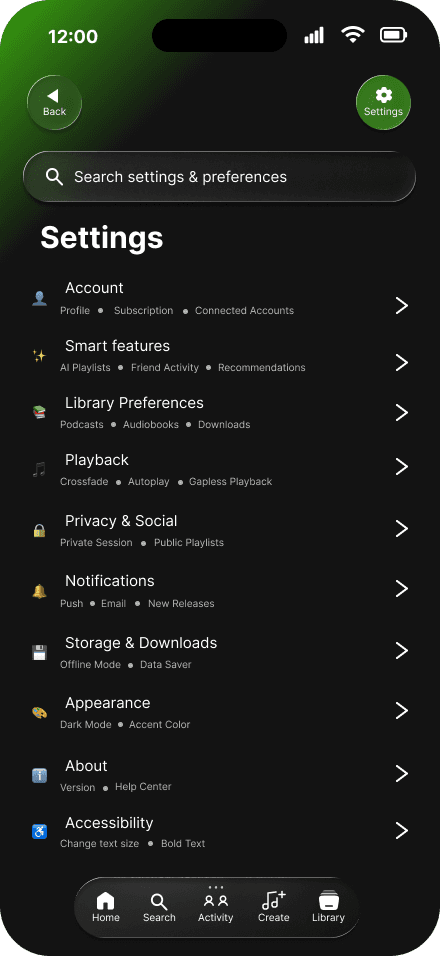
Accessibility without adding more clutter
I originally considered keeping accessibility controls visible in the main interface, but that added another permanent control to an already busy experience. I moved options like text size and bold text into Settings so users still have control without making the primary interface heavier.
Bringing stream counts to mobile
Spotify already shows stream counts on desktop, so I brought the same context into the mobile experience without introducing another screen or disrupting playback.


05
Key Design Decisions
01
Separate the Library instead of removing content
What I chose: I reorganized the Library into clearer spaces for Music, Podcasts, Liked, and Pinned content.
Why: The problem wasn’t that Spotify had too much content. It was that too many different content types were competing for the same space. Separating them made the Library easier to scan without taking anything away.
Trade-off: More dedicated sections in exchange for a cleaner and more predictable Library.
02
Keep Create, remove Add
What I chose: I removed the separate Add action and kept Create as the main destination for playlist creation and AI-powered tools.
Why: As the redesign developed, the two actions started overlapping and made the navigation busier than it needed to be.
Trade-off: Fewer shortcuts in exchange for clearer navigation and a more defined purpose for Create.
03
Put social features in dedicated spaces
What I chose: I created dedicated Activity and Friends experiences instead of keeping social features scattered across the app.
Why: I wanted following someone on Spotify to have more purpose than just seeing what they were currently playing. Grouping activity, Stats, and friend discovery gave the social experience a clearer role.
Trade-off: More destinations in exchange for richer social interaction and easier discovery.
06
Testing & Validation
Usability Testing
Improving the interface structure based directly on user feedback.
I tested the prototype with two users to see whether the redesigned structure made sense without explanation. I gave each tester realistic Spotify tasks and observed where they moved naturally, hesitated, or expected the experience to work differently.
Testing Tasks
Find saved, liked, or pinned music
Find Listening Stats
See what friends are listening to
Use Create to start a personalized playlist
Findings
Before → After

07
Outcome & Reflection
What I Learned
Personalization does not always mean adding more. Testing showed me that simplifying the structure could make the experience feel clearer and more intentional.
Limitations
The project was tested with only two users, and some prototype interactions were limited by Figma rather than behaving exactly like the real Spotify app.
Next Steps
Test the revised Activity flow again, expand testing beyond two users, refine prototype fidelity, explore accessibility further, and test the Create experience separately


Next Project
Zayd Tauqeer
UX/UI & Product Designer
© 2026
↓ Download Case Study PDF
Interactive Figma prototype · Opens in new tab